
If you decide you’d like to leave a community you are a member of, you can do so on archive.storycorps.org and on the StoryCorps App.
Please note: if you leave and then decide you want to rejoin a moderated community, you will need to request to join again and wait for your membership to be approved before you can submit interviews and access other interviews in the community.
Leaving a community from archive.storycorps.org
- Log in to your account on archive.storycorps.org.
- Click on your profile photo in the upper right corner of the screen and select My Interviews & Profile from the drop down menu.
- Select the Communities heading on your profile page.
- Find the community you would like to leave and select Visit.
- From the main community page, select Leave Community.
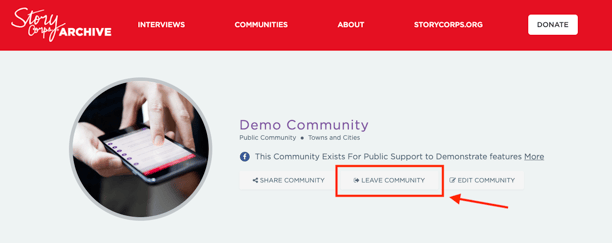
- That’s it! You are no longer a member of the community.
Leaving a community from the StoryCorps App
- Open the StoryCorps App and login to your archive.storycorps.org profile.
- Select the profile icon on the bottom right side of the app navigation bar.
- From your profile, select the My Communities
- On the My Communities page, select the community that you would like to leave.
- Once you are on the community page, select Leave.
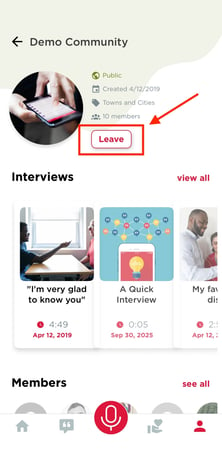
- That’s it! You are no longer a member of the community.