
You can download a copy of any interview audio that is accessible on archive.storycorps.org to a desktop or laptop computer by following the steps below:
- Navigate to the interview page
- Click the share icon on the media player (seen below) to access the share menu.

- On the share menu, select Download from the list of available options.
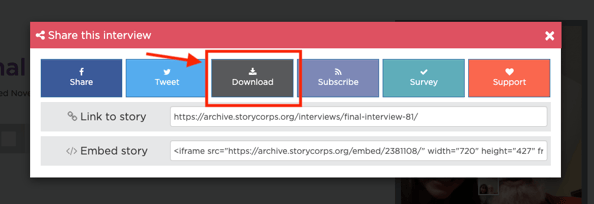
After you've selected Download, the steps you need to take to finish downloading the audio will depend on the web browser you are using. We've included instructions for Safari, Google Chrome, and Mozilla Firefox below.
Safari
If you’re using Safari, the interview audio will be automatically downloaded to your computer and you do not need to take any additional steps to complete the download.
Google Chrome
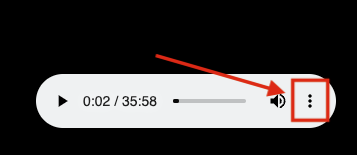
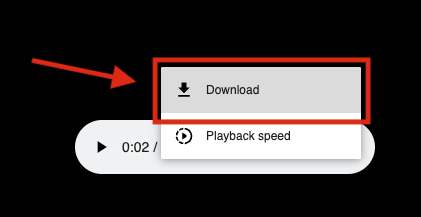
If you’re using Google Chrome, you'll be redirected to a screen with a stand alone media player. To complete the interview download, select the three dots on the right side of the media player and select Download from the dropdown menu.
Mozilla Firefox
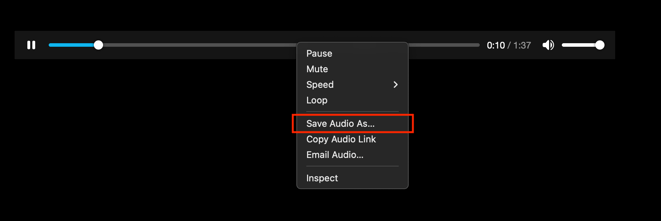
If you’re using Mozilla Firefox, you'll be redirected to a stand alone media player. To complete the interview download, right click the media player. A drop-down menu will appear and you can select Save Audio As to save the audio to your computer.
Can’t find your StoryCorps App interview in the Online Archive?
If your interview does not appear on archive.storycorps.org and it was recorded with the StoryCorps App, the only copy of the interview is on the device you used to record. You can recover a copy of your audio by following the instructions below.
Exporting your interview audio from the StoryCorps App
If you recorded onsite or virtually with a StoryCorps facilitator, and your Signature StoryCorps Interview is not available in the Online Archive, you can submit a request so our Audience Experiance team can send you a link to download your interview. In your request, please include your interview ID, the names of all participants, and the date you recorded your interview.